Your photo is the starting point
Use a solo photo with a visible face and clothes. Fergie Baby AI is intended for your own look, with no costume or filming session required.
Step into the Harlem swagger walk. Turn a favorite photo into a
Fergie Baby AI video with your own look and model-generated hip-hop audio.
12 seconds · 9:16 vertical · 720p · Seedance 2.0 Fast
One person. A clear face. Full body works best.
Model-generated hip-hop audio
Your photo is a character reference, not a fixed first frame.100 credits per video · Failed tasks refunded
By generating, you confirm you have permission to use this photo. It will be sent to our video provider for processing.
This example is a finished generation, not your uploaded photo.
FROM ONE PHOTO TO A REAL RESULT
This is the exact photo used to create the Fergie Baby AI example. Follow the same steps with your own image. No filming, template hunting, or prompt writing.
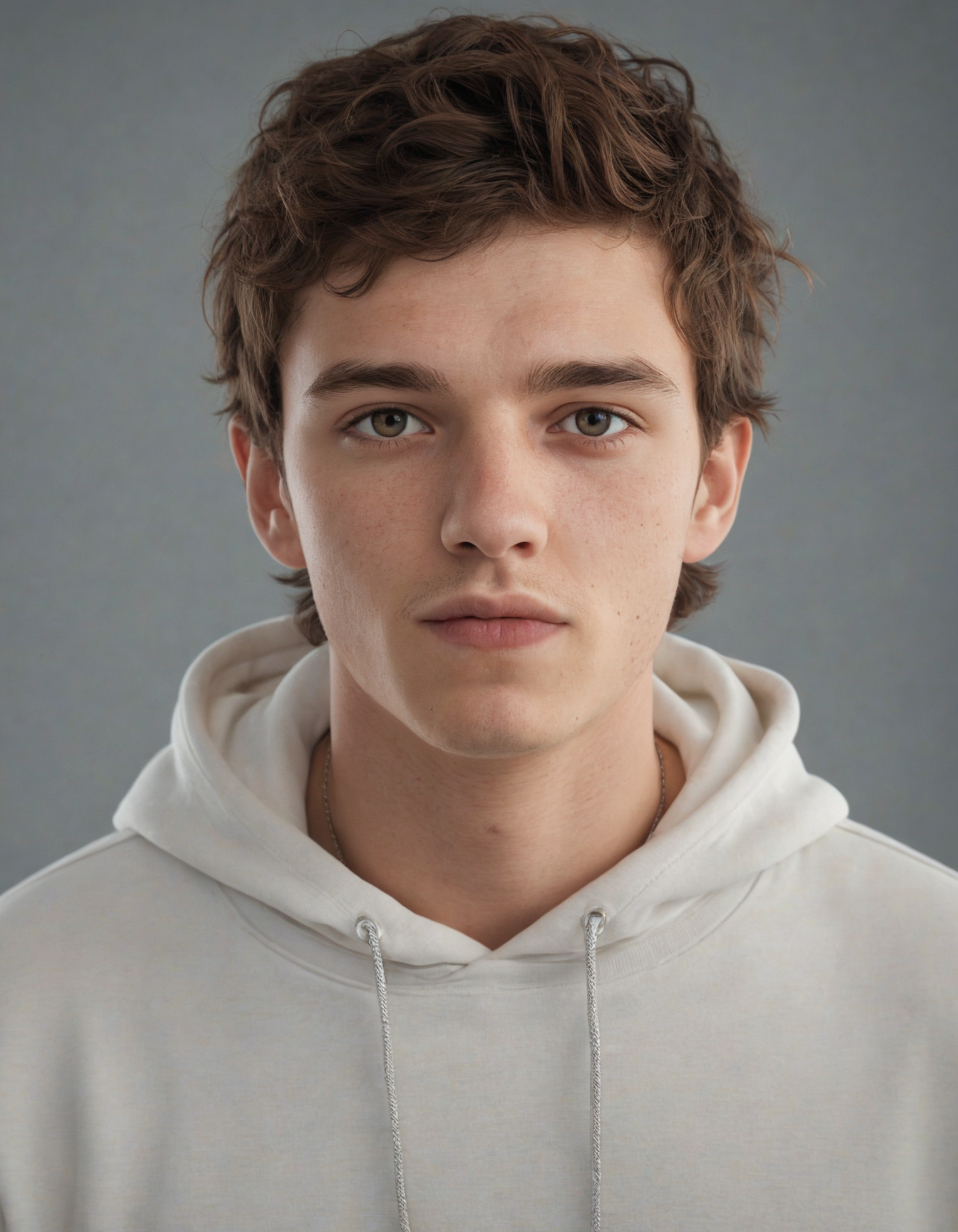 THE ORIGINAL PHOTO
This portrait gives Fergie Baby AI the face, hair, and hoodie to work from. A full-body photo helps if you want specific trousers or shoes.
Choose one JPG, PNG, or WebP image, up to 10 MB. Keep the face visible and use a photo you have permission to share.
Sign in and press Generate video. The Fergie Baby AI generator handles the gate entrance, swagger walk, and model-generated audio. Settings are fixed at 12 seconds, 9:16, and 720p.
Your Fergie Baby AI result replaces the example in the tool above. Play it, check the sound, and open the video to save a copy. You can return with the same account to check your latest task.
The same Fergie Baby AI sample, with model-generated movement and audio. The model fills in details outside the original portrait; each generation can vary.
THE TREND, WITHOUT THE GUESSWORK
The Fergie Baby AI trend is about a recognizable mood: a confident walk, a park setting, and a camera that moves with you. Your face and outfit make the idea personal.
Want to write your own prompt?Use a solo photo with a visible face and clothes. Fergie Baby AI is intended for your own look, with no costume or filming session required.
The soundtrack comes from the video model, not an attached Fergie Baby song. Review the generated audio before posting, or edit the sound in your preferred video app.
A Fergie Baby AI video belongs in a vertical feed. Think a personal fit check, an unexpected birthday greeting, or a playful Harlem walking trend edit.
FOR THE HANDS-ON CREATORS
Looking for a Fergie Baby AI prompt? This is the tested prompt used by our photo-to-video tool. Your reference photo supplies the person, while the instructions describe the setting, gestures, and camera movement. Results still vary between runs.
Create a realistic 12-second vertical smartphone video using the person in the uploaded reference photo. Preserve their exact facial identity, hairstyle, body shape and clothing. The person confidently steps through an open chain-link gate of a basketball court in a New York Harlem park, onto a red rubber walking path. Green grass, tall metal fences, trees, park benches and brick apartment buildings in the background. They swagger toward the camera with relaxed bouncing steps, rhythmic shoulder drops, expressive hand gestures, hands briefly touching their head, pointing at the lens, tapping their chest and opening their arms wide. They smile and rap to an energetic old-school New York hip-hop beat. The visible person is the only vocalist. Match the rap vocal gender to the character depicted in the uploaded reference photo: female rap vocals for a female character and male rap vocals for a male character. Keep the same matching voice throughout, synchronized with their lip movements. No off-screen vocalist, no additional singers, and no lip-syncing to another voice. One continuous full-body tracking shot. The camera moves smoothly backward at walking speed, keeping the person centered. Natural afternoon sunlight, authentic candid TikTok smartphone footage, realistic movement, consistent face, no cuts, no extra people, no subtitles, no logos, no watermark.
Our generation prompt · Individual results may varyA FEW THINGS YOU MIGHT BE WONDERING
From the right photo to the right soundtrack. Here is what to know before making your Harlem walk video.
Back to the generatorIt is a photo-to-video trend inspired by Harlem rapper Fergie Baby's confident park walk. People use AI to animate themselves walking toward the camera with a rhythmic bounce and expressive gestures. Fergie Baby AI refers to this walking trend, not a baby-face filter or a tool for predicting a baby's appearance.
Choose a clear photo, sign in, and select Generate video. Fergie Baby AI uses a preset gate entrance and swagger walk, with model-generated audio. Each clip is 12 seconds, vertical 9:16, at 720p. Watch the task status here, then open the finished video to save it to your device.
Choosing and previewing your photo is free. Generating one Fergie Baby AI video costs 100 credits, deducted when your task starts. If the provider confirms a generation failure or cancellation, those credits are returned when the task status is checked. A temporary connection error does not start a new paid task.
Choose a well-lit picture of one person, ideally showing the full body or at least from the knees up. Keep the face sharp and unobstructed. Avoid group shots, heavy blur, sunglasses, and cropped heads. An outfit photo gives a Fergie Baby AI generation more visual information than a small face-only selfie.
No. Seedance generates the video and its audio from the preset prompt. We do not attach the original recording or promise to reproduce the rapper's voice. Audio and movement may vary between runs. To use a trending sound, check the music options available to your account and intended use on your posting platform.
The Fergie Baby AI video generator uses the tested prompt shown below, so there is nothing to write and no CapCut template to find. The model, duration, resolution, and portrait ratio are preset. Choose your photo and generate; the server handles the video request and tracks the result.
Fergie Baby AI uses your photo as a character reference and asks the model to preserve your face, hairstyle, body shape, and clothes. This version uses one tested gate-entrance walk. Other movements and music controls are not available. AI may still change small details, so review your result before sharing.
AI video can change facial details, hands, clothing, or the way a person moves. A clear reference helps, but perfect identity preservation cannot be guaranteed. The Fergie Baby AI example on this page is a real generation from the reference photo shown in the tutorial. Your result will vary with your photo and each generation.
Yes. Upload a photo in a modern mobile browser and generate a 12-second, 720p vertical video for TikTok, Reels, or Shorts. You can return to this page with the same account to check your latest task. Open the finished video to save it; download it promptly because provider links may expire.
Selecting a photo previews it locally. When you press Generate, the image is uploaded through our server to Haomao for processing by the video model. We store task and billing status to restore your latest result. Provider retention is subject to its policies. Only submit photos you have permission to use.
THE NEXT WALK COULD BE YOURS
Create your Fergie Baby AI video. One photo. 12 seconds. 100 credits.
Create my video 100 credits per video. Sign in to get started.An independent creative tool. Not affiliated with or endorsed by Fergie Baby.